
invideo AI
Screenshots
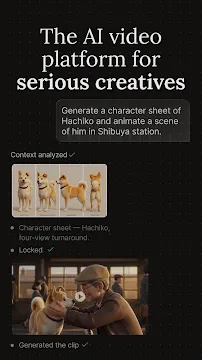

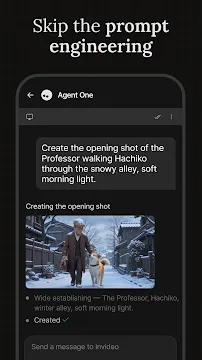
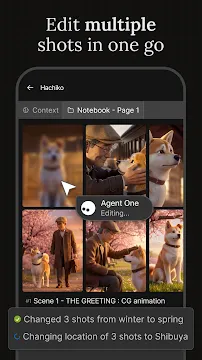
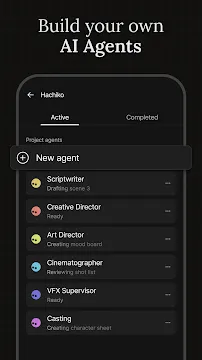
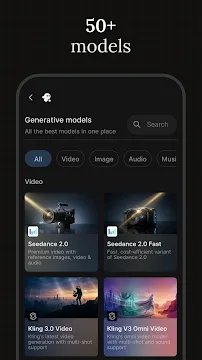
invideo AI changes how you create video content on your mobile device. You can turn your written thoughts into high-quality videos within minutes. This tool simplifies the entire video production process for creators. First, you type a simple prompt into the tool. Then, the advanced AI generates a complete script. It also selects relevant stock footage and adds a realistic voiceover. You do not need previous editing experience to use invideo AI. Therefore, anyone can produce professional videos quickly. Many people use it to make content for social media networks. For example, you can create shorts, reels, and marketing videos. The tool gives you editing capabilities right in your pocket. Consequently, you save hours of tedious work on your computer. You can work from anywhere at any time. This flexibility helps you stay ahead of your content schedule.
What Is invideo AI and How Does It Work?
invideo AI utilizes artificial intelligence to automate video editing and creation. You start by opening invideo AI on your mobile phone. Then, you enter a descriptive text prompt in the generation box. You can specify the topic, tone, and target platform. For instance, you can ask for a funny video about cooking. Next, the AI analyzes your request instantly. It scripts the narrative and pulls matching clips from a massive media library. Furthermore, the tool generates a natural-sounding voiceover in your chosen language. You can review the initial draft on your screen immediately. If you dislike a section, you can change it with another text command. This interactive process makes content creation smooth and fast. Thus, invideo AI acts like a personal video crew. You control the direction while the AI does the heavy lifting. The system updates the video in real-time based on your feedback. You can watch the changes happen instantly on your screen.
Core Features of invideo AI on Mobile
invideo AI offers an impressive set of tools for video creators. These features help you transform ideas into engaging visual stories easily.
Here are the main features you will find inside invideo AI:
- Text to Video Generation: Turn any written prompt into a complete video draft.
- Automated Script Writing: The AI writes engaging scripts based on your specific topic.
- Smart Media Matching: The tool automatically finds high-quality clips to match the words.
- Realistic Voiceovers: Choose from various human-like voices and different accents for your narration.
- Text-Based Editing: Change elements of the video by typing simple commands to the AI.
These features work together to streamline your creative workflow. Therefore, you do not need to hunt for stock footage manually. The tool handles the script, voice, and visuals simultaneously. You can also customize the aspect ratio for different platforms. For example, choose square for posts or vertical for stories. This option ensures your content fits perfectly everywhere.
How to Create Content Using Text Prompts
Creating videos with text prompts requires clear communication with the AI. First, you must define your main goal. Think about what you want your audience to learn or feel. Then, write a detailed prompt inside invideo AI. Include specific details like the target audience and the platform. For example, mention if the video is for TikTok or YouTube. You can also specify the style of music you prefer. After that, press the generate button and wait for the AI. The tool processes the instructions and builds the video layout. Next, look at the generated scenes carefully. You can adjust the script if some words sound unnatural. Then, you can replace any clip that does not match your vision. Finally, export the finished file to your mobile device gallery. This method removes the stress of traditional video editing. You can produce high-quality content without any technical skills.
Benefits of Editing Videos with invideo AI
Using invideo AI offers several major advantages for modern content creators. The primary benefit is the massive amount of time you save. Traditional editing requires hours of cutting clips and syncing audio tracks. However, invideo AI handles these tasks in just a few seconds. Another benefit is the reduction in production costs. You do not need expensive software subscriptions or high-end computers. This mobile tool runs smoothly on your phone. Additionally, it helps you maintain a consistent posting schedule. Content creators often struggle to produce enough videos for their followers. With this tool, you can generate multiple videos every day. Higher output can lead to better engagement on your social profiles. Furthermore, you can test different content ideas quickly. If a video idea fails, you lose only a few minutes of work. Finally, the tool lowers the entry barrier for beginners. Anyone can express their creativity without technical hurdles.
Target Audience for This Mobile Video Creator
Many different groups of people can benefit from using invideo AI. Social media influencers use it to create quick daily updates. They can turn trending news into videos immediately. Small business owners also find great value in this tool. They create promotional videos for their products without hiring marketing agencies. Consequently, they save money while growing their brand online. Educators use invideo AI to make lessons more interesting for students. They can convert dry text chapters into colorful animated explainers. Freelance marketers use it to complete client projects much faster. Even hobbyists use the tool to share their personal stories. Therefore, the user base is highly diverse. If you need to communicate an idea visually, this tool helps you. You do not need a big budget to achieve great results. It supports everyone from students to professional marketers.
Tips to Get the Best Results
You can maximize the potential of invideo AI by following a few simple strategies. First, write highly specific prompts instead of vague ones. Detail the exact steps or points you want the video to cover. Second, experiment with different voice styles to match your content. A serious topic requires a calm and professional voice tone. Conversely, a travel video benefits from an energetic narrator. Third, utilize the text-editing box to fine-tune your final draft. Do not hesitate to ask the AI to replace specific clips. For example, you can type “change the background clip to an ocean scene”. Fourth, keep your videos concise to retain viewer attention. Short and snappy videos usually perform better on mobile platforms. Then, review the pacing of the video before exporting. Make sure the transition between scenes feels natural. Lastly, check the generated script for accuracy before sharing. These steps ensure your content looks polished and professional.
Conclusion
In conclusion, invideo AI redefines content creation for mobile users. The tool combines artificial intelligence with automated video editing. You can skip the difficult learning curve of traditional editing software. Instead, you just type your ideas and watch them come to life. The tool manages scripts, media, and voiceovers efficiently. Transition words like then, therefore, and however help show the clear benefits. You can create content for various platforms without stress. This tool saves time, reduces costs, and boosts your productivity. Start using invideo AI today to elevate your video creation process. It changes how you share stories with the world.